

Swagbucks: How to Get Paid for Surveys & Tasks Online

By Alex David Du · Updated
Alex writes about gaming, tech, and simple online income ideas, and builds projects that bring ideas to life.
If you’re bored, scrolling your phone, or just want a way to make a little extra cash without doing anything wild, Swagbucks is actually worth checking out. It’s not going to replace your job or anything, but it can be a simple way to earn some side money doing stuff you already do online.
What you can get paid for
-
Taking short surveys about random stuff like shopping or snacks
-
Watching ads and short videos (yep, really)
-
Searching the web using their search bar
-
Playing games or trying out apps
-
Clicking through cashback offers when you shop online
If you're looking for something totally passive, or just wanna feel productive while chilling on the couch, this might be your thing.
Just to be straight up with you, most people make around $2 to $5 a day on Swagbucks. That’s the average. Can you make more? Yeah, totally. I’ll show you how to level up later in this post. But it’s not consistent, and it takes some effort and patience.
What Is Swagbucks and How Does It Work?
Swagbucks is a site that pays you for doing small online tasks. Think surveys, ads, apps, that kind of thing. It’s super simple, and honestly, kind of a low‑effort way to turn boredom into a bit of money.
How it works: You do a task → You earn SB points → You trade those SB for PayPal cash or gift cards.
Everything you do on Swagbucks earns you SB points. Once you’ve got enough, you can cash them out for stuff like:
-
PayPal (real money, straight to your account)
-
Amazon gift cards
-
Apple, Zalando, and a bunch of other stores
No minimum skills, no weird downloads (unless you want to), and no pressure. You just pick what you want to do and earn at your own pace.
Setting Up Your Swagbucks Account
Getting started with Swagbucks is honestly super simple. You don’t need to fill out pages of forms or give them your life story. Just a quick sign‑up and you’re good to go.
Here’s what you do:
-
Go to the Swagbucks website
-
Enter your email and create a password
-
Confirm your email address
-
That’s it. You’re in
Once you’re signed up, you’ll land on the Swagbucks dashboard. It might look a little cluttered at first, but don’t worry. It’s way simpler than it seems. You’ll get the hang of it fast.
You might even get a survey offer right away. Don’t skip it. Those first surveys usually pay a few SB just for joining. It’s an easy way to start building up points without doing much at all.
Swagbucks might also ask a few questions about your age, location, or interests. That just helps them send you better surveys later on. The more accurate your profile is, the fewer “Sorry, you don’t qualify” messages you’ll get.
And nope, you don’t have to download anything unless you want to. Their mobile app and browser extension are optional, not required.
The Main Ways to Earn (Surveys, Tasks, Searches & More)
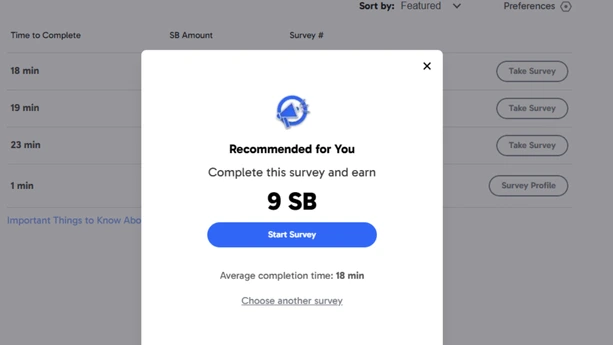
Once you’re in, there are a bunch of ways to earn SB points on Swagbucks. Some are passive, others take a little effort. You don’t have to do everything. Just pick what fits your mood or how much brain power you’ve got left.
Surveys
This is probably the most common way to earn. Swagbucks will send you surveys based on your profile. Some are short and sweet. Others are longer but pay more. Pro tip: even if you don’t qualify, you often get 1 SB just for trying.
Watch videos
You can let videos play in the background and rack up SB while doing something else. It’s not a ton of points, but it adds up if you’re chilling anyway.
Search the web
Use their search bar instead of Google and earn random SB as you go. You won’t earn every single time, but it’s free points for stuff you were already searching for.
Play games or try apps
Sometimes Swagbucks will offer SB for downloading and playing a mobile game or trying out a new app. Some pay more than others, especially if you complete certain levels or actions.
Daily poll and checklist
There’s a daily poll that takes literally one second. Plus a daily checklist you can complete for bonus points. Super easy wins.
Shopping & cashback
If you shop online, Swagbucks has cashback offers through tons of stores. Just click through their link before you buy something and get a % back in SB.
Use the mobile app
Swagbucks has a mobile app that makes it easier to access everything on your phone. You can do surveys, watch videos, and check your SB balance without opening a browser.
Invite your friends and family
Swagbucks gives you a referral link (like the one you add at the top). If someone signs up through your link, you get 10% of whatever they earn for life.
How Much Can You Actually Make?
Let’s be real. Swagbucks isn’t a magic money machine. You’re not going to pay rent with it. But if you play it smart, it can give you some extra cash every week.
Most people make around $2 to $5 a day doing surveys, videos, and small tasks. High‑paying app offers or game installs can push some days higher, but they take more time and are not steady.
Rough ranges:
-
Surveys (30 - 60 min): about $1 to $3
-
Videos (passive): about $0.25 to $1
-
Search bar (passive): about $0.10 to $0.50
-
Daily poll and checklist (1 - 2 min): about $0.10 to $0.30
-
App or game offers (1 - 3 hours): $5 to $20+ (not steady)
-
Referrals: varies, you get 10% of what they earn
Tips to Earn More Without Wasting Time
-
Skip long surveys with low pay. Aim for better pay per minute.
-
Check the Discover tab for higher‑paying offers. Read the terms and cancel trials if you will not keep them.
-
Use the mobile app when you are out.
-
Let videos run while you cook or clean.
-
Hit daily goals and bonuses. Small points add up.
-
Set a 30‑minute limit so it does not feel like a grind.
How and When You Get Paid
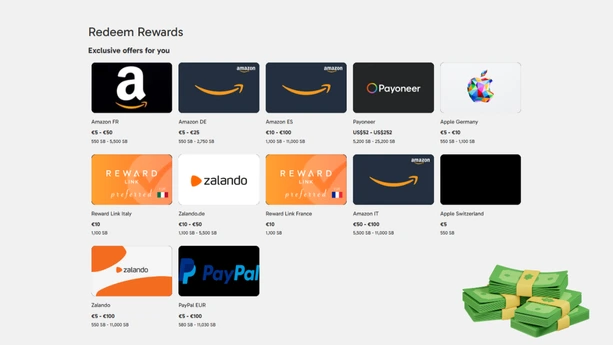
When you’ve earned enough SB, you can trade them in for PayPal cash or gift cards. Make sure the email you use on PayPal matches the one on your Swagbucks account.
To redeem:
-
Click your profile picture
-
Go to Redeem Your SB
-
Pick a reward for your country
PayPal examples (EUR):
| PayPal Amount | SB Required |
|---|---|
| €5.00 | 580 SB |
| €10.00 | 1,130 SB |
| €25.00 | 2,780 SB |
| €50.00 | 5,530 SB |
| €100.00 | 11,030 SB |
Notes: Swagbucks does not take a cut. Instant transfer on PayPal may charge a small fee. First‑time or large redemptions can take longer. Gift card options vary by country. Always check the Redeem page for current rates.
What this is good for
Swagbucks is fine for small money, not a paycheck. Use it when you are bored or waiting, set a short timer, and stop when the payout drops. Go for quick wins, the daily poll, short surveys that pay well per minute, a few background videos, and the odd high‑paying offer you actually want. Skip long surveys that pay little. Read the fine print on trials. Cash out to PayPal or a gift card once you hit your goal so points do not sit. If you invite friends, treat it as a bonus, not a plan. Keep it light, keep it safe, and let it cover snacks or a small bill.