
Silksong Patch 2, what changed and what actually matters

By Alex David Du · Updated
Alex writes about gaming, tech, and simple online income ideas, and builds projects that bring ideas to life.
I’ve been watching Silksong for a while, and Patch 2 finally made me pause my run and take notes. It is on Steam’s beta branch right now, so it is optional, but it already clears out a bunch of annoying bugs and softlocks. There is also a new Dithering option in the graphics menu that helps reduce color banding on some screens.
This feels like a cleanup pass, not a big balance shift. I did not notice nerfs. Bosses still hit hard. Movement still rewards focus. The world feels a little cleaner at the edges, which is exactly what I wanted before the next round of tweaks.
Patch 2 Details:
| Area | What changed | Why it matters |
|---|---|---|
| Video settings | New Dithering option to reduce color banding | Helps if gradients look blocky on your display. Defaults Off and can make foregrounds look a bit softer. |
| Boss stability | Fixes to lava boss getting stuck, Second Sentinel knock outs, cleaner death sequences | Fewer weird fights and broken wins. Behavior polish, not balance changes. |
| Enemy AI and encounters | Reduced chance of Silk Snippers or Shrine Guardian Seth going out of bounds | Less jank during set piece battles so runs feel fairer. |
| Softlocks | Shaman Crest binding softlock fixed, other transition edge cases addressed | Saves runs from being bricked mid area. Solid quality of life win. |
| Achievements | Herald’s Wish description clarified | Stops confusion on what “complete” means. You must finish the wish and the game. |
| Difficulty | No nerfs planned in this patch | Challenge stays the same, just cleaner. Team Cherry flagged this directly. |
What’s actually fixed, in human terms
Patch 2 is a clean the edges update on Steam’s beta branch. The headline is a new Dithering toggle in Advanced video settings that reduces color banding. It is off by default and can make foregrounds look a little softer. Most of the rest is bug cleanup, like bosses or enemies getting stuck or slipping out of bounds, a softlock tied to Shaman Crest binding, and a fix so Volt Filament damage behaves as intended. No boss nerfs. Difficulty stays the same.
What that means when you play, fights finish the way they should, fewer odd arena breaks, and your tools act the way the game explains them. If gradients look blocky on your screen, try the Dithering option. If not, you can skip it. If you missed Patch 1 on September 11, you can read Team Cherry’s official notes here: Silksong Patch 1 now live.
The new Dithering setting, when to use it
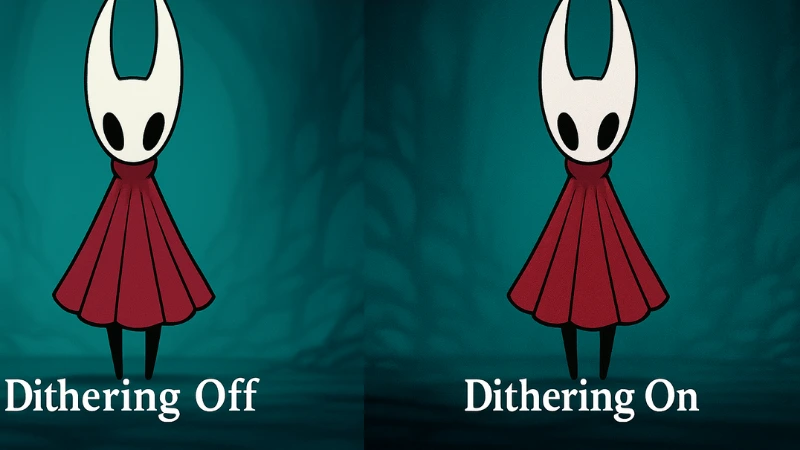
Dithering is a trick that breaks up color banding by sprinkling tiny noise between shades. If you ever see skies or fog look like steps instead of a smooth gradient, that is banding. Turning on Dithering blends those steps so the gradient looks cleaner.
Here is when I turn it on or leave it off.
| Your screen looks like this | What I do | Why |
|---|---|---|
| Big blocks in gradients, skies look stepped | Turn Dithering On | The added noise hides the blocks |
| Everything already looks clean | Leave it Off | No need to add grain you will not notice |
| OLED or high contrast display, banding only in a few areas | Try On, then compare | If it softens edges too much, turn it Off |
How to try it, open Settings, go to Video, then Advanced, and toggle Dithering. Move to an area with soft lighting, switch it On and Off, and pick what looks better to your eyes.
If you want a quick refresher on what dithering is at a tech level, this is a good primer, not game specific, just the basics, What is dithering.
Does the game feel different after Patch 2
Short answer, the difficulty feels the same. Bosses still hit hard. You still need to learn patterns, time your dodges, and pick safe heal windows.
The change is in the edges. Fewer weird boss stalls, fewer out of bounds slips, and less chance of a softlock ruining a good run. It feels cleaner, not easier.
Performance is the same for me. Frame pacing and input feel unchanged. No new content, no new charms, no enemy damage tweaks. If you speedrun, a couple of odd skips feel less reliable now because the geometry bugs got fixed, so routes may shift a bit.
What I noticed after a few sessions:
Fewer reloads due to stuck fights
Cleaner arena transitions
Builds behave closer to the description
Visuals can look nicer if Dithering helps your screen
If you are on the fence, treat this as a stability pass. It smooths rough corners without touching the core feel. Backup your save, try the beta, and see if the small fixes matter to you.
Should you hop on the beta branch or wait
If bugs have been getting in your way, join the beta. Patch 2 clears a bunch of edge cases and adds the Dithering toggle. It feels like a safe upgrade for most players.
If you want zero risk, wait for the full release. Beta builds can add new hiccups. Your save should be fine, but I still back it up before switching.
Quick rules I use:
Join now if you hit softlocks or out of bounds slips
Join now if your screen shows color banding and you want the new setting
Wait if you play once a week and just want a stable build
Wait if you are mid speedrun and do not want routes to shift
How to try the Steam beta branch, step by step
If you want Patch 2 now, you can switch to the Steam beta in a minute. Here is how I do it.
Open Steam, go to Library, right click Hollow Knight, Silksong, then click Properties.
Click Betas on the left.
In the dropdown, pick the public beta branch. No code needed.
Close the window. Steam will queue an update. Let it download.
Launch the game. You should be on the beta build.
A few quick tips before you flip the switch:
Back up your save. Turn on Steam Cloud for the game, then make a local copy of your save folder too, just in case.
If anything feels off, you can repeat the steps and switch the Betas dropdown back to None to return to the normal build.
Mods and tools may break on beta. Keep that in mind if you use anything outside the base game.
What I’m watching next, balance, consoles, and timing
Here is what I am keeping an eye on after Patch 2.
Balance nudges
I want to see if Team Cherry touches boss damage windows or heal safety in the next patch. Patch 2 fixed bugs, it did not change numbers. If anything shifts, it will be clear in tough fights and charm setups.Performance and input
Frame pacing feels the same to me. I will watch busy rooms and effect heavy bosses to see if any stutter shows up after the beta rolls to stable.Console rollout
PC got the beta first. I am watching for timing on Switch, PlayStation, and Xbox so the fixes land for everyone. I also want to see if the Dithering option appears on consoles or if it stays PC only.Save safety
Softlocks were a pain. I will keep checking for odd binds or room transitions that can still trap a file.Speedrun routes
Some geometry fixes already make a few skips less reliable. If more map edges get cleaned up, routes may change again.UI and settings polish
Small things matter. Clearer achievement text, a few extra graphics toggles, or better default brightness could land next.