

Understanding the Encryption Definition with Real Examples

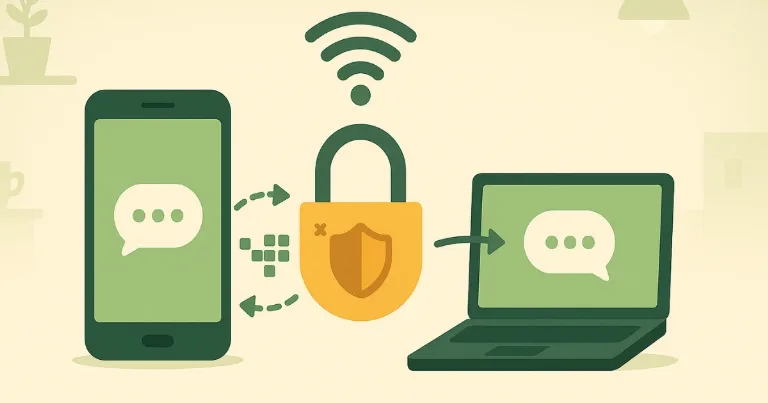
A friend once asked at a crowded café, why does the tiny padlock in the browser matter. I pulled out my phone, sent him a short note, then showed him the scrambled version a network tool captured, a sea of numbers that meant nothing to anyone without a secret key.
What does encryption mean in one line?
Encryption turns readable data, called plaintext, into unreadable data, called ciphertext, using a key, then lets the right key turn it back.
That single move protects card numbers on checkout pages, private photos on a phone, and the message you send that says, meet at 7.
What happens under the hood
Your app turns the bytes of your message into blocks, picks a fresh random value called an initialization vector, then runs a modern cipher such as AES GCM or ChaCha20 Poly1305 with a secret key. The output is ciphertext plus a short authentication tag that proves the data was not altered. The other side uses the same key, checks the tag, and recovers the original message.
Key terms you need, plaintext, ciphertext, key, cipher, algorithm
Here are the names that keep showing up, plus one concrete hook for each.
| Term | Short meaning | One example |
|---|---|---|
| Plaintext | The original readable data | The string, meet at 7 |
| Ciphertext | The scrambled output | A block of bytes that looks random |
| Key | The secret value that controls the cipher | A 256 bit number for AES |
| Cipher | The actual method that does the scrambling | AES for storage, ChaCha20 in some phones |
| Algorithm | The formal recipe, often used interchangeably with cipher | AES is an algorithm defined in a public standard |
If a term feels abstract, say it out loud next to its example. The pair sticks better.
Symmetric vs asymmetric, what changes and when to use each
Symmetric encryption uses the same key to encrypt and decrypt. It is fast, good for large files and live traffic. AES is the common choice.
Asymmetric encryption uses a key pair, a public key you can share and a private key you keep secret. It is slower, so it protects keys and creates signatures. RSA and elliptic curve systems such as P 256 are common.
A typical pattern mixes both. Use asymmetric methods to agree on a fresh session key, then switch to a fast symmetric cipher for the actual data.
Real examples that matter
HTTPS in your browser
Open a shopping site and click the padlock. The browser checks a digital certificate from a trusted authority, agrees on a fresh session key with the server, then encrypts every request and response with a fast cipher such as AES GCM or ChaCha20 Poly1305. On café Wi Fi, an eavesdropper sees only ciphertext.
End to end messaging
Send a chat that says, pizza at 7, and your app encrypts it on your phone, the server forwards only ciphertext, and the other phone decrypts it. The service cannot read the message. Many apps add forward secrecy, a property where keys change often so an old key leak does not expose future chats.
Disk and phone storage
Turn on FileVault on a Mac, BitLocker on Windows, or device encryption on Android and iOS. The system derives keys from hardware and your passcode, then encrypts each file or the entire disk. If a laptop is lost in a taxi, the data stays unreadable without the unlock secret.
A tiny demo, text in, ciphertext out
Below is a simple teaching tool that shows symmetric encryption with a shared key. The left box turns the word Hello into ciphertext using the secret key 123, the right box uses the same key to return Hello.
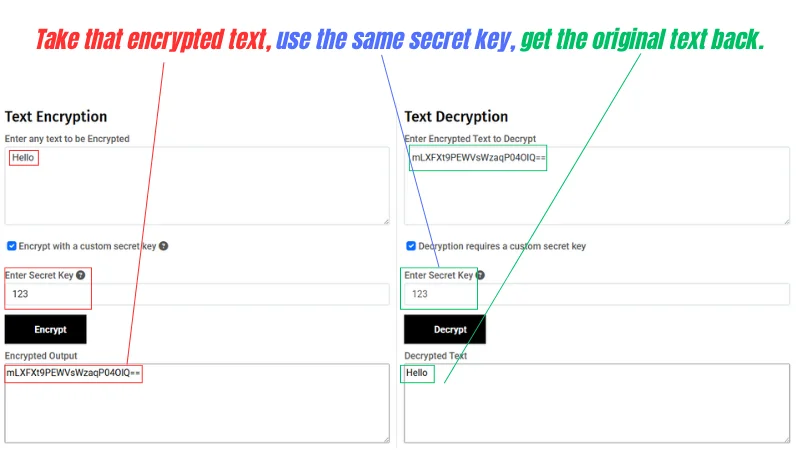
Use this only to build intuition. The short key is weak, and the output string is Base64 encoded so it can be copied. Real systems use long random keys and authenticated ciphers.
Popular ciphers in practice
AES and ChaCha20 for speed
AES is widely used for storage and network traffic, and many processors include AES instructions that make it quick. ChaCha20 works well on devices without those instructions and pairs with Poly1305 for message authentication.
RSA and ECC for key exchange and signatures
RSA remains common for certificates and compatibility. Elliptic curve cryptography, such as P 256 and X25519, reaches similar security with shorter keys and is now the default for many key agreement steps.
Key size and strength, what the numbers mean
Key length is measured in bits. A 128 bit symmetric key has 2^128 possible values, a number so large that guessing by brute force is not realistic with current computing. RSA needs larger numbers to reach similar strength, often 2048 or 3072 bits. Elliptic curve keys are far shorter for the same target.
A safe default today is AES 128 or AES 256 for data, RSA 2048 or stronger for compatibility, and P 256 or X25519 for new systems. Avoid outdated choices such as DES, which used a 56 bit key and is now broken by modern hardware.
Encoding vs hashing vs encryption, the quick difference
People mix these up. The table keeps them apart.
| Method | What it is for | Who can reverse it |
|---|---|---|
| Encoding | Change format for transport or storage | Anyone, no secret required |
| Hashing | Create a fixed length fingerprint of data | No one, it is one way |
| Encryption | Keep content private | Only someone with the right key |
Examples to map this in your head, Base64 is encoding for attachments, SHA 256 is hashing for file integrity, AES inside TLS is encryption for web traffic.
When encryption fails in the real world
-
Weak passwords turn strong ciphers into easy targets. An 8 character password is guessable with common tools.
-
Phishing steals keys and tokens. A realistic looking login page can trick even careful users.
-
Bad key storage leaks secrets. Keys in code repositories or logs often end up on the internet.
-
Skipping certificate checks invites man in the middle interception. Always verify who you are talking to.
-
Unencrypted backups undo good work. A secure phone with a cloud backup in plaintext still leaks data.
-
Broken randomness creates predictable keys. Systems must use a strong random source when they generate keys.
Each failure is avoidable with process and checks, not just code.
Choosing the right approach for your case
Data at rest
Turn on full disk or file based encryption, enforce screen locks, and protect keys with hardware modules where available. Rotate keys if regulations require it, and make sure backups are encrypted too.
Data in transit
Use TLS 1.3 on public services, prefer modern cipher suites with AES GCM or ChaCha20 Poly1305, and enforce HTTPS everywhere with HSTS. Monitor certificate expiry and automate renewals so outages do not force insecure fallbacks.
User to user messages
Pick an app with end to end encryption, verify safety codes or keys with the other person, and enable encrypted backups if the platform offers them. For sensitive chats, turn on disappearing messages so old data does not pile up on unlocked devices.
If you remember only one thing, remember the pairing, public methods to agree on a fresh key, then fast symmetric ciphers to protect the actual data. That mix is why the padlock in your browser quietly keeps the café eavesdropper in the dark.
FAQs
-
Yes. They see destination IP, timing, and often DNS unless you encrypt DNS. The content stays private.
-
Usually no. Rewrap the small data keys with a new master key. Re encrypt only if you change the cipher or policy.
-
Yes, with a device only index. Cloud wide search usually means the service can read messages.
-
No. Encryption protects data in transit and at rest. Anything shown on screen can be captured at the endpoints.